H1P EVB Manual
Version 0.4.1 · Released Sep 24, 2026
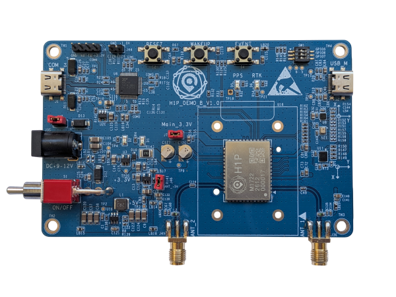
Guide to the HYFIX H1P EVB-B evaluation board: a dual-antenna GNSS/RTK module with heading output, onboard IMU, magnetometer and barometer. Covers unboxing and power-up, hardware interfaces, driver and firmware setup, and controlling the board with H-center.
CRITICAL SAFETY NOTE
Never apply power to the USB connector (SN#9) and the DC 9–12 V connector (SN#7) at the same time. Simultaneous dual power sources may damage the board.
Get started
- Check the kit. EVB-B unit, 2 active GNSS antennas (5 m cable), 2 USB cables. See Unboxing Checklist.
- Power up. USB on SN#9 with jumper cap SN#8 installed (default), or 9–12 V DC on SN#7 with the cap removed. See Power Supply & Safety.
- Connect. Serial ports run at 115200 8N1; WebUI is at http://192.168.7.1 over USB-NCM with no driver. See Getting Connected.
- Control the board. Use H-center to add the interface, set messages, record data and configure NTRIP. See Control EVB with H-center.
What's in this manual
-
Unboxing, power and safety, default serial ports, UBX support, NMEA HPR definition.
-
Board overview, labeled interfaces (SN#), jumpers, reset button, antennas, sensors.
-
USB-to-UART driver, WebUI access, firmware upgrade, single and dual antenna setup.
-
Interfaces, message settings, commands, record and replay logs, NTRIP client and server.
-
Reading UBX Messages with pyubx2
Parse UBX output from Port C in Python.
-
Driver and COM port, WebUI, firmware upgrade and NTRIP/RTK issues.
-
Appendices
-
Changes from 0.1.0 to 0.4.1.
Default output at a glance
All serial ports use 115200 baud, 8 data bits, no parity, 1 stop bit.
| Port | Default output |
|---|---|
| Port A | NMEA GGA @ 1 Hz |
| Port B | NMEA GGA, RMC and HPR @ 5 Hz |
| Port C | UBX messages @ 1 Hz, RTCM3 MSM7 @ 1 Hz |
| Port D | Reserved |